

Finding the best gadgets for the elderly means looking past gimmicks and focusing on what genuinely makes daily life safer and more manageable. This round-up covers the seven devices that have the most measurable impact on independent living in 2026. Each has been selected for ease of use, reliability, and the real problems it solves for older adults.
Quick Summary — All 7 Gadgets at a Glance
Seven of the best gadgets for elderly people across every major need, such as hearing, mobility, fall prevention, safety alerts, and daily convenience. Spot what you need and jump straight to the full review below.
| # | Product | Category | Best For | Price | Verdict |
|---|---|---|---|---|---|
| 01 | Rechargeable OTC Hearing Aids for Seniors Best Overall | Hearing Assistance | Mild–moderate hearing loss | $$$ | Top hearing pick |
| 02 | VOCIC Electric Lift Recliner Chair Best Premium | Mobility Furniture | Standing from seated position | $$$$ | Best premium pick |
| 03 | Sintron Adjustable Bed Stand Assist Bar | Mobility Aid | Standing from bed / balance | $$ | Best bedside bar |
| 04 | Fanwer Large Button Universal TV Remote | Daily Living | Arthritis & low vision | $ | Best remote control |
| 05 | App-Controlled Caregiver Bed Alarm System | Fall Prevention | Night-time exit monitoring | $$ | Best fall prevention |
| 06 | Amazon Echo Show 8 (3rd Gen) Smart Display | Smart Home | Connectivity & reminders | $$ | Best tech pick |
| 07 | Personal Emergency SOS Button & Alert System | Emergency Safety | Seniors living alone | $$ | Best safety device |
Featured Products
Why These Eight Products
The best gadgets for the elderly share a common quality: they restore something the person was beginning to lose — whether that’s the ability to hear a conversation clearly, stand up from a chair without help, or know that pressing one button will bring assistance in an emergency. Each product here was assessed not just on specification but on what it actually delivers in a real home environment, for a person who may be dealing with reduced strength, limited dexterity, or unfamiliarity with technology.
We’ve organised the eight picks across five categories: hearing assistance, mobility aids, fall prevention, daily living convenience, and connected technology. Together they cover the full range of challenges that elderly people and their families most commonly face when trying to maintain safe, comfortable independent living at home.
In Detail — Every Product Reviewed
 Best Overall
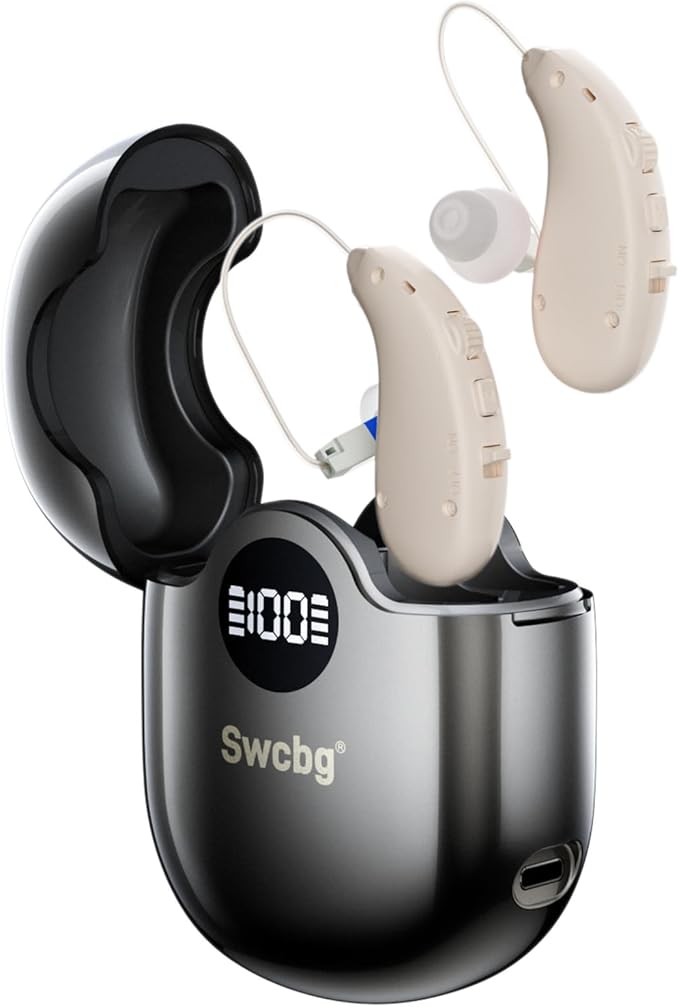
Hearing loss is the most common and most underaddressed sensory challenge facing elderly people — and over-the-counter rechargeable hearing aids have made effective amplification more accessible than ever before. This category of device is designed for mild to moderate hearing loss, fitting discreetly in or around the ear and providing adjustable amplification without a prescription or audiology appointment. The rechargeable battery design is a critical feature for elderly users: no fiddling with tiny disposable batteries, no risk of running flat unexpectedly. Most units charge fully in two to three hours and last a full day of use. Sound quality has improved dramatically in OTC devices — modern options offer noise reduction and directional microphone settings, reducing the exhausting effect of background noise in conversations. For seniors who have resisted hearing aids due to cost or stigma, the compact, lightweight design and significantly lower price point compared to clinical aids removes most of the traditional barriers.
The gadget that improves quality of life most immediately — restoring the ability to follow conversations, hear the television at a normal volume, and engage fully in daily life.
 Best Bedside Bar
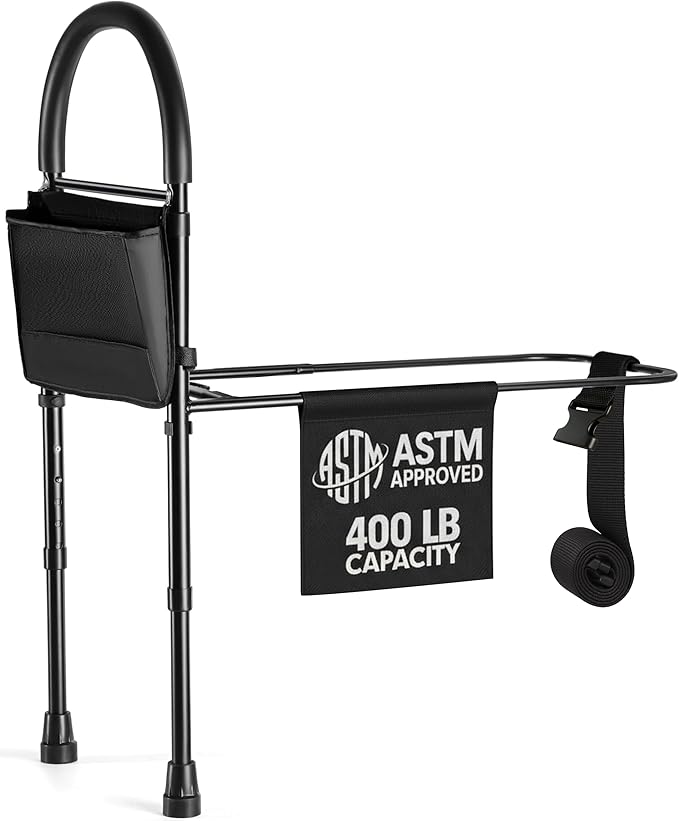
The Sintron Adjustable Bed Assist Bar solves a different and equally critical mobility challenge: getting safely out of bed and achieving a stable standing position. Unlike a standard bedside rail that simply prevents rolling out, this upright support bar is positioned to give the user something solid to push against and grip as they swing their legs over the edge and stand. The anti-slip base and adjustable height mean it fits a wide range of bed heights and body sizes, and the magnetic mounting system ensures it stays firmly in place during use. For elderly people who are unsteady in the seconds immediately after rising — when falls are most common — having a fixed, reliable grab point at standing height makes a significant difference. Occupational therapists frequently recommend floor-to-standing-height assist bars as a first-line intervention for elderly patients with balance difficulties, after-effects of stroke, or recovering from joint surgery.
Provides the stable anchor point that turns a risky getting-up moment into a controlled, confident one — one of the most consistently recommended bedside safety items in occupational therapy.
 Best Premium Pick
For elderly people with significant difficulty rising from seated positions — whether due to severe arthritis, hip or knee replacement recovery, Parkinson’s, or general loss of lower body strength — an electric lift recliner chair is the most comprehensive solution available. The VOCIC AX25 uses a motorised lifting mechanism to gently tilt the seat forward, bringing the user to an almost-standing position with minimal physical effort required. It also reclines fully for resting, with the motor doing all the work at the touch of a button on the wired remote. The ultra-compact design fits smaller living rooms without dominating the space, and the T-stabilised frame handles users up to the stated weight capacity securely. Unlike standard recliners adapted with accessories, this is purpose-built for elderly comfort and safety — the fabric is easy to wipe clean, the armrests are at an optimal height for pushing to stand, and the lift mechanism is smooth and quiet. This is the highest-ticket item on this list, but for the right person — particularly anyone who has had a fall while trying to stand from a chair — it’s transformative.
The premium mobility solution for elderly people with significant standing difficulty — replaces the daily risk and effort of rising from a chair with a quiet, effortless motorised lift.
 Best Fall Prevention
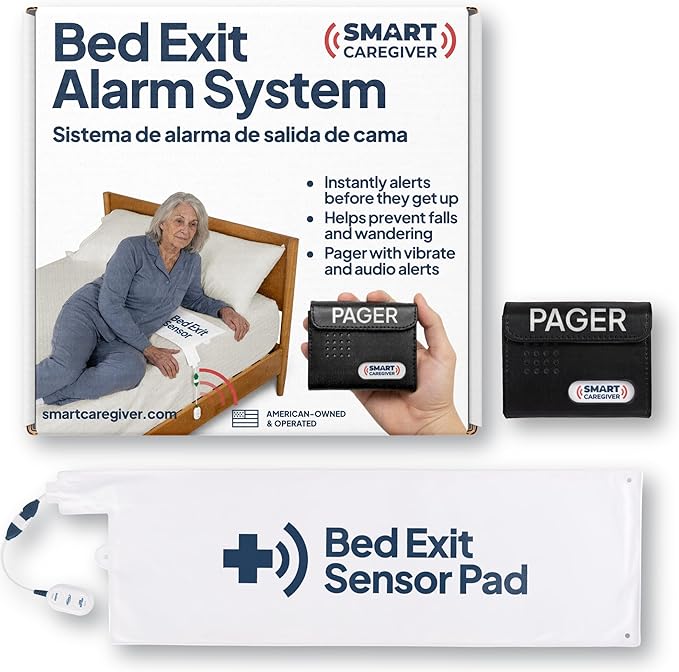
This app-connected bed alarm system represents a significant upgrade on standard pressure-pad alarms — adding smartphone notification capability so a caregiver monitoring remotely can be alerted the moment an elderly person exits the bed. A sensor pad under the mattress detects when the person’s weight leaves the bed, triggering both a local alarm at the bedside receiver and a push notification to a connected smartphone app. This dual-alert approach means the system works whether the caregiver is asleep in the next room or checking in from a distance. The waterproof design of the pendant SOS button included in the system adds a further safety layer — the person can call for help from the shower, garden, or anywhere in range. Medication reminder capability through the app means the same system can also be used to prompt the user at set times throughout the day. For households where an elderly parent is monitored by an adult child who doesn’t live full-time in the home, this is among the most versatile and comprehensive safety gadgets available.
The most connected bed safety system on this list — combines fall prevention, remote smartphone alerts, and a waterproof SOS button in one package with no monthly monitoring fee.
 Best Safety Device
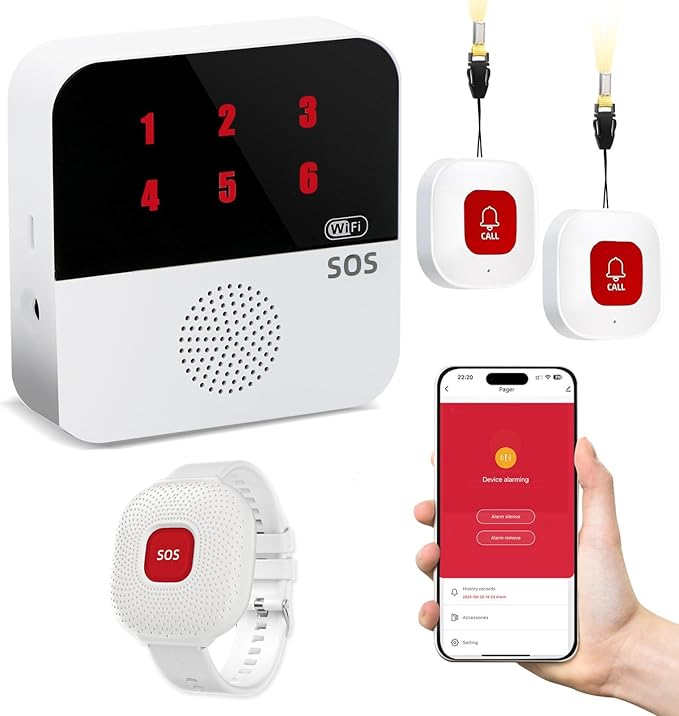
A dedicated personal emergency button is the single most important safety gadget for any elderly person who spends time alone at home. This wearable SOS button transmits a distress signal to a paired receiver unit — alerting a caregiver or family member in another room or on a monitoring system — with a single large press. The button itself is designed for maximum accessibility: large enough to locate by touch, requiring minimal pressure to activate, and wearable as either a pendant or wristband so it’s always within reach. The range covers a typical home and garden. Unlike subscription-based monitoring services, this system requires no ongoing fees — it’s a self-contained device that works straight out of the box. For elderly people who are reluctant to wear an alert device, the lightweight and discreet design of modern SOS buttons has largely removed the stigma that plagued older medical alert pendants. Wearing it consistently is the single most important factor in whether it saves a life — and a device the person actually wants to wear is one that will be worn.
Simple, effective, no subscription required — one press summons help regardless of where the person is in the home, and the wearable design means it’s always accessible when needed most.
 Best Remote
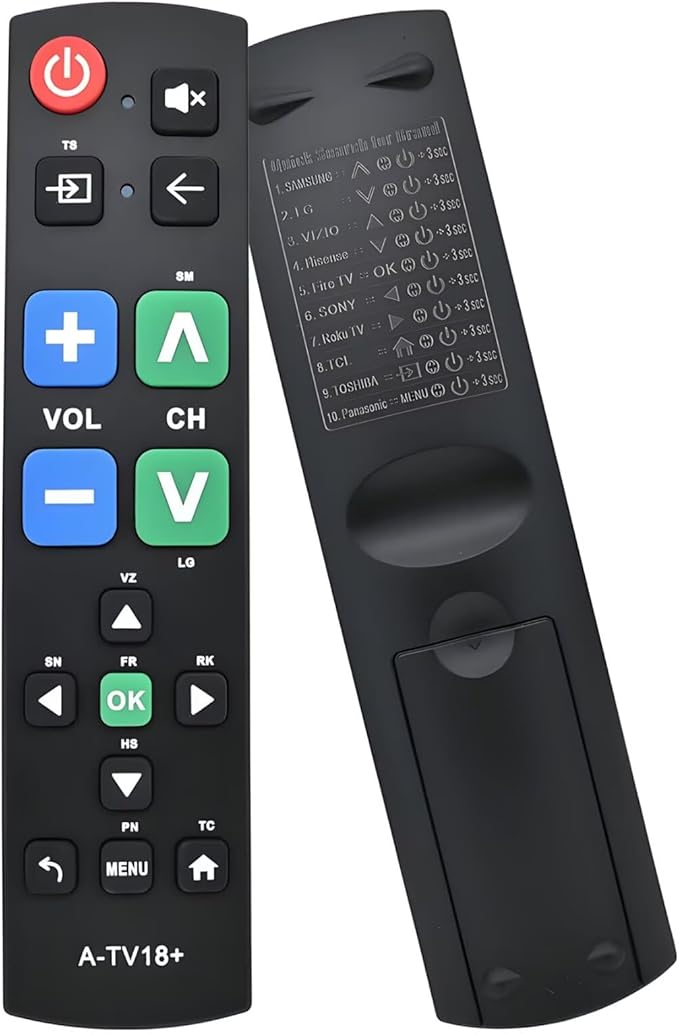
A standard television remote is, by design, one of the most difficult everyday objects for elderly people to use — small buttons, low contrast labelling, and a layout that requires remembering which button does what. The Fanwer Large Button Universal TV Remote addresses every one of these problems. The buttons are large, high-contrast, and clearly labelled — findable by touch and readable even with reduced vision. It programs to work with virtually any major television brand, replacing the existing remote rather than adding a second device to manage. The layout is simplified to only the functions that matter most: power, volume, channel, and a handful of essentials — removing the clutter of input switching, picture settings, and streaming controls that an elderly person is unlikely to use or want. For elderly people with arthritis, tremors, or low vision, this is one of the smallest purchases on this list but one that significantly reduces daily frustration with a device they use every single day.
Fixes one of the most consistent daily frustrations for elderly people at minimal cost — makes the television genuinely easy to control again, with large buttons that can be found and pressed reliably.
 Best Tech Pick
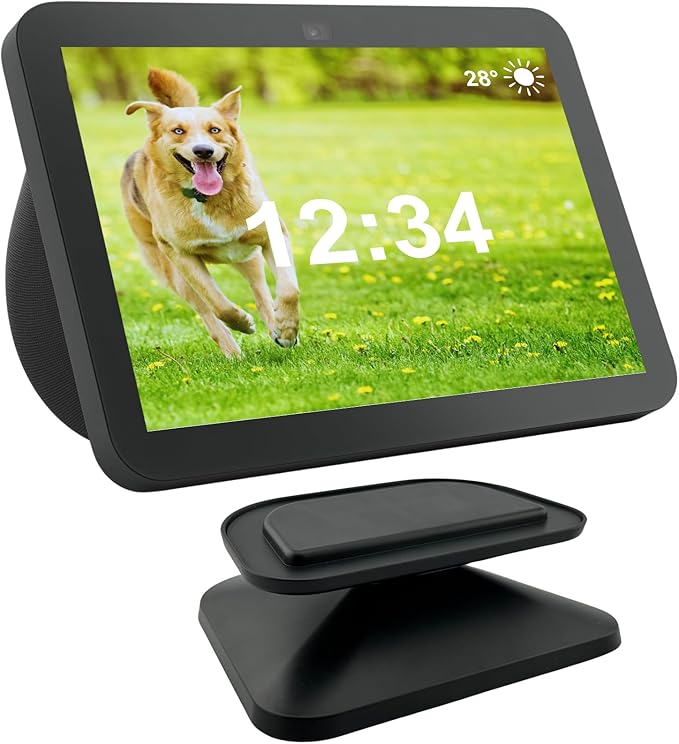
The Amazon Echo Show 8 remains the best all-round smart home gadget for elderly people, and the third generation brings improved camera quality and faster processing to an already excellent platform. The 8-inch HD display paired with Alexa voice control means the majority of daily tasks can be completed without touching the screen at all — a critical advantage for users with dexterity difficulties. Medication reminders, weather updates, music, timers, video calls to family, and smart home controls are all accessible with a simple voice command. The Drop In feature allows family members to check in remotely without the elderly person needing to answer — they simply appear on screen — providing reassurance without requiring any action. The third generation’s 13MP wide-angle camera makes video calls clearer and easier, and the adaptive colour display adjusts brightness automatically throughout the day. For elderly people who are open to a small learning curve, and have a family member who can handle initial Wi-Fi setup, this device meaningfully reduces isolation and keeps daily routines on track.
Connects an elderly person to their family, their routine, and their home — video calls, reminders, music and smart controls all by voice, with no buttons to press or apps to navigate.
How to Choose the Right Gadget for an Elderly Person
The right gadget depends entirely on what the person actually struggles with. Buying something advanced often means buying something that won’t get used. These are the six questions we ask before making any recommendation.
What’s the Primary Problem?
Hearing loss, difficulty standing, fall risk, social isolation, and missing medication are the five most common challenges. Identify which is most pressing and solve that first — one gadget that addresses the right problem outperforms five that address the wrong ones.
Who Sets It Up?
Some devices need no setup at all — the sofa assist handle is immediately usable. Others, like the Echo Show, need Wi-Fi, an account, and a family member to configure them initially. Match the device to the setup resources available, not just the budget.
Technology Comfort Level
A large-button TV remote requires zero learning. A bed alarm requires no action from the user at all. The Echo Show requires voice commands. Overestimating how comfortable an elderly person is with technology is the most common reason these purchases go unused.
Ongoing Costs
Most gadgets on this list have zero monthly fees — including the bed alarm and the SOS button. The Echo Show requires optional Amazon Prime for some features. The hearing aids are a one-time purchase. Always factor total cost of ownership, not just the purchase price.
Physical Limitations
Arthritis, tremors, reduced grip strength, and low vision all affect which devices are practical. Large-button remotes and one-press SOS buttons work well across almost all physical limitations. Touchscreen-only devices often don’t — the Echo Show works because voice is the primary input.
Start Simple, Build Up
A stand assist handle, a large TV remote, and an SOS button together cost under $120 and cover the most common daily needs. Start with the minimum effective kit — add hearing aids, a bed alarm, or an Echo Show once the simpler devices are working reliably and in daily use.
Full Comparison: All 8 Best Gadgets for the Elderly
Every product side by side — category, who uses it, whether Wi-Fi is needed, and approximate cost. Use this to build a complete care kit or compare two specific options quickly.
| Product | Category | Used By | Subscription? | Wi-Fi Needed? | Approx. Cost |
|---|---|---|---|---|---|
| Rechargeable OTC Hearing Aids Best Overall | Hearing Aid | Elderly person | None | No | ~$150–$300 |
| Sofa Stand Assist Handle | Mobility Aid | Elderly person | None | No | ~$30–$50 |
| Sintron Bed Assist Bar Recommended | Mobility Aid | Elderly person | None | No | ~$40–$70 |
| Fanwer Large Button TV Remote | Daily Living | Elderly person | None | No | ~$20–$35 |
| App-Controlled Bed Alarm System | Fall Prevention | Caregiver monitors | None | Yes (app alerts) | ~$50–$90 |
| Amazon Echo Show 8 (3rd Gen) | Smart Display | Both | Optional Prime | Yes | ~$100–$130 |
| Personal Emergency SOS Button | Emergency Safety | Elderly person | None | No | ~$30–$60 |
| VOCIC Electric Lift Recliner | Mobility Furniture | Elderly person | None | No | ~$400–$700 |
All prices approximate. Check current Amazon listings for latest pricing and availability.
Our Verdict
Gadgeteon Editors · May 2026
The best gadgets for the elderly are the ones that solve a real problem without adding a new one.
After evaluating this range of senior gadgets and care technology, these eight products are the ones we’d recommend to a family member without hesitation. Start with the SOS emergency button if the person spends time alone — it’s the highest-impact safety purchase and has no ongoing costs. Add the sofa stand assist handle and bed assist bar for daily mobility, the large-button TV remote for immediate daily-life improvement, and the rechargeable hearing aids if hearing loss is a factor. The app-controlled bed alarm covers nighttime fall prevention with remote smartphone alerts. And the Echo Show, for those with some technology comfort, genuinely transforms how connected an elderly person feels to their family and daily routine. The VOCIC lift recliner is the premium recommendation for anyone with significant standing difficulty — an investment that pays back immediately in independence and safety.
Best Gadgets for the Elderly — Frequently Asked Questions
The questions families and carers ask most when choosing gadgets for elderly relatives — answered directly from real-world experience with these products.